Google is at it again. They have announced that come July 1, 2013 Google Reader will be discontinued.
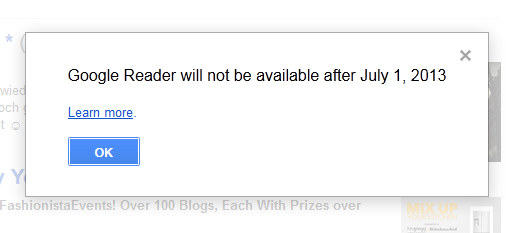
Google, why do you giveth and then taketh away so often? I am so over it. I also know that once Google has decided to taketh away, taketh away it will no matter how much I complain. So what to do if you are like me and subscribe to countless feeds via Google Reader? It’s time to export those feeds into another RSS reader of your choice. Fortunately, it’s an easy process.
- Go to your Google Reader and when the message above appears, go ahead and click on the “Learn more” link.
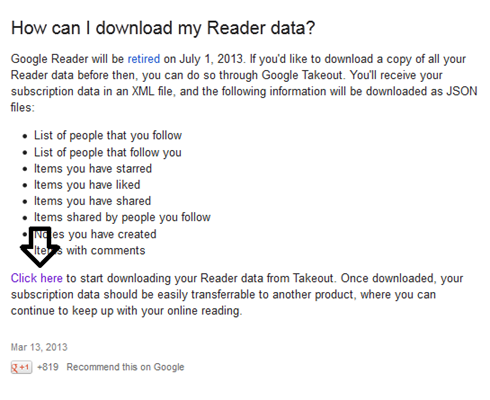
- That will take you to a page that reads, “How can I download my Reader data?”, read it the page, and click on the link that says, “click here.”
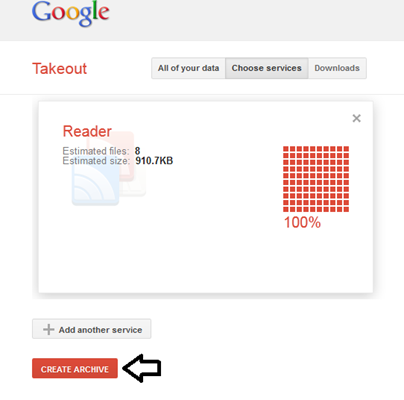
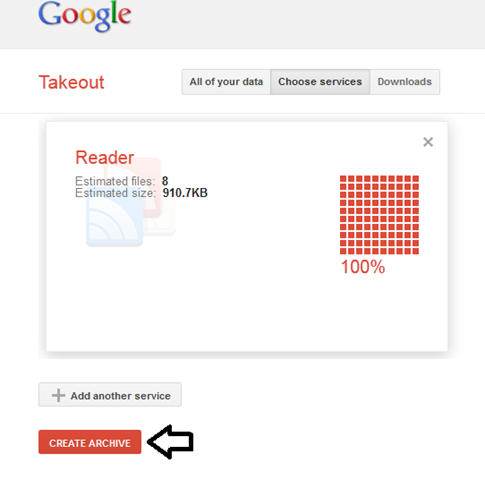
- That will lead you to Google Takeout, once the size of your files are estimated go ahead and click on “CREATE ARCHIVE”.
- Once your archive has been created, click on download, you will be prompted to sign into your Google account using your password. Go ahead and do it.

- Save the .zip file somewhere easy to find on your computer.

That’s it. Now you are ready to import your feeds into the reader of your choice. I imported my subscriptions into both NuffnangX and Bloglines (just covering my bases). Follow the import directions for whatever reader you choose. Some will let you import the .zip file as is and others you will have to extract the files and import only the “subscriptions” file that will be in opml (whatever that means, you don’t need to know what it means to be able to do the import).
Update: The following exchange took place in the comments section, I’m sharing it here in case the answer is of use to anyone.
Comment: Apparently I need to know the opml and I don’t have a clue what that is.
Response: You don’t need to know what it is, just where it is. Export your info, extract the files in the zip file, open the folder that is titled whatever your email is and ends with -takeout, that will take you to another folder called Reader, open the Reader folder, find the file called ‘subscriptions’ and that is the opml (in other words that is the file you are going to import into your new reader). Let me know if you need more help.
I am so not happy about this.
Me neither!
I don’t want Takeout. I don’t want Feedly. Why, oh why, Google?
Oh yes…this is surely going to cause us all a lot of trouble. I’ve just been reading about it and finding alternatives to Reader, though I doubt if anything can be as good as this.
Thanks for sharing 🙂
I HATE Google period
Can we protest? Can anything be done? I want Google Reader!
What on earth!!!!????? Crap, next thing you know they are going to take blogger away 🙁 Thank you for sharing this Claudya, cause I have to go do this now!
Google really makes me mad and I have to say I would be terrified if I was still on Blogger because this isn’t the first time they just discontinue something. It’s just not right.
Hubby and I were discussing me moving to a self hosted site. I may be ready to do that because getting my blog deleted would be very hard for me!!! Thank you again for drawing my attention to this!! I exported my feeds, but I don’t know what I am going to use now.
I wish I saw this before. When I transferred I lost 4000 readers. I’m still really sad about it.
Oh no, that’s terrible. I’m sorry.
You are such a lifesaver!!! I didn’t know this. I don’t use Google Plus because I am afraid that my google at work and my google at home will somehow merge. Even with different email addresses, some things seem to overlap! Research commences now.
Apparently I need to know the opml and I don’t have a clue what that is.
You don’t need to know what it is, just where it is. Export your info, extract the files in the zip file, open the folder that is titled whatever your email is and ends with -takeout, that will take you to another folder called Reader, open the Reader folder, find the file called ‘subscriptions’ and that is the opml (in other words that is the file you are going to import into your new reader). Let me know if you need more help.
Visit me at: http://www.unknownmami.com.
Why Google why? Reader was one of my absolute fav things! arrrrggghhh
I am in the process of importing my files. I am really upset by this. I had a system that worked and I was happy with it. UGH! Thanks for the tips. Thanks to you, my transfer went smoothly!
I feel like Google does this to me all the time. I find it so aggravating to get hooked on one of their products just to have it taken away.
Visit me at: http://www.unknownmami.com.
How long did it take for yours to import? Mine has been at it for a few hours.
Hmmm, mine only took minutes, but I only imported my Reader info, not all of my Google Products info.
I’m doing just the Reader. I started over and only selected a few items. It worked fine. So that’s how I will do it until all are saved. Thanks!!
Thanks for the info on some choices for the Reader. I have used Reader for so long and it worked great for me. Oh well, I will learn something else.
Thanks Mami, this was helpful!
My pleasure. Hugs to you from San Francisco.